How do watermark removers work? What they actually do to the pixels
Short answer: almost every watermark remover throws away the pixels under the mark and paints new ones that fit the surroundings. That is called inpainting. It does not "lift" the watermark off; it replaces the area with a guess.
The one exception is mathematical: if you know exactly how the watermark was blended in (its shape, colour and opacity), you can reverse the blend and get close to the real pixels back. In our test that cut the error from 27–39 (inpainting) to 4.6 (reversing the blend), on a 0–255 scale.
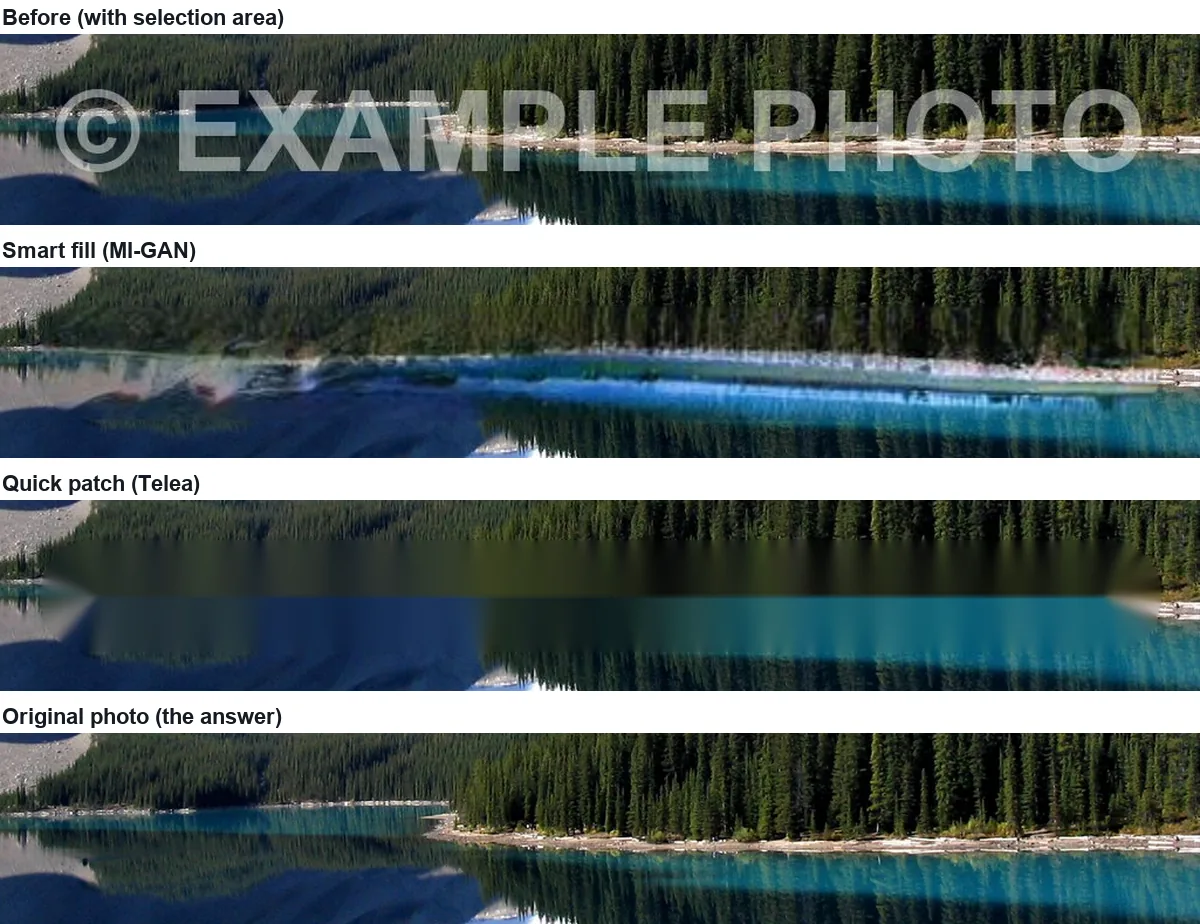
We tested this on one photo where we know exactly what is under the watermark, because we put it there. Below are the four ways software can deal with a visible watermark, what each one does to the pixels, and the numbers from the test.
The test photo
We took a public-domain photo of Moraine Lake (Wikimedia Commons, see sources), scaled it to 1280 × 960, and stamped a white "© EXAMPLE PHOTO" across the shoreline at 45% opacity (alpha 115 of 255). The untouched photo is our answer key. We then painted a selection over the watermark (85,929 pixels) and let Eraslino fill it with each of its two methods.

Method 1: pull the edges inward (diffusion)
The oldest family of inpainting fills a hole from its border inward, each new pixel a weighted average of the known pixels next to it. Eraslino's "Quick patch" is one of these: Alexandru Telea's fast-marching method (2004), ported from OpenCV's INPAINT_TELEA. It is instant and needs no model, but it cannot invent texture, so anything wider than a few pixels turns into smooth streaks.
Method 2: copy patches from elsewhere in the photo
Patch-based methods search the rest of the image for small squares that match the edge of the hole and copy them in. PatchMatch (Barnes et al., SIGGRAPH 2009) made that search fast enough for interactive editing such as hole filling. It reproduces texture well when the photo contains more of the same texture. Eraslino does not use this method, so we have no numbers for it here.
Method 3: generate the missing area with a trained model
Learned inpainting models have seen millions of photos and generate pixels that are plausible for the scene. Eraslino's "Smart fill" runs MI-GAN (Sargsyan et al., ICCV 2023), a small model trained on the Places2 scene dataset, inside your browser. It produces texture instead of streaks, but the texture is invented: it is what a lake shore usually looks like, not what this one looked like.
Method 4: reverse the blend (only when the watermark is known)
A semi-transparent watermark is a blend. For each pixel, the photo you see is
seen = (1 − α) × original + α × watermark colour
so if you know α and the watermark colour at every pixel, you can solve for the original:
original = (seen − α × watermark colour) ÷ (1 − α)
We know both, because we made the watermark. Reversing it pixel by pixel brought back the real shoreline. The small error that remains comes from JPEG compression of the watermarked file: dividing by (1 − 0.45) multiplies that compression noise by about 1.8.
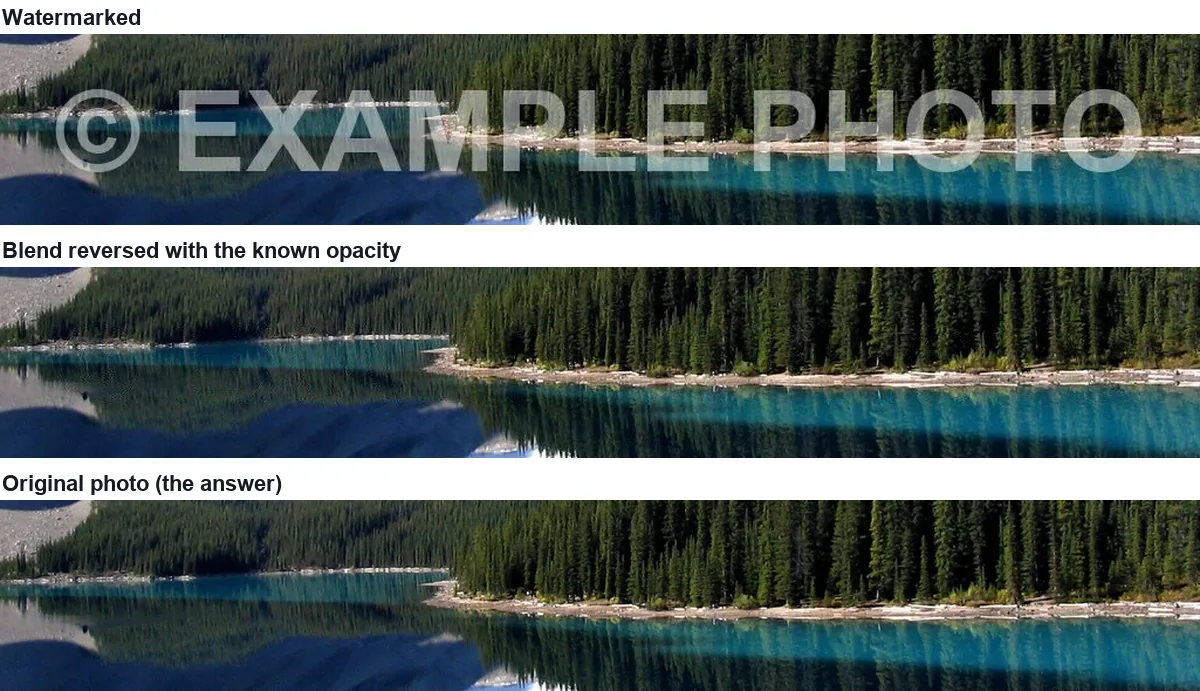
This is also how the strongest automatic attack on stock-photo watermarks works. Dekel, Rubinstein, Liu and Freeman (Google Research, CVPR 2017) showed that when the same watermark is stamped the same way on a whole collection of images, an algorithm can estimate the watermark and its opacity from the collection and then reverse it on every image. Their suggested defence is to warp each copy of the watermark slightly at random, so no single estimate fits them all.
The numbers
Error is the mean absolute difference from the original photo over the 85,929 selected pixels, averaged over red, green and blue (0 = identical, 255 = opposite). "Detail" compares the fine texture inside the selection with the original (1.00 = as much fine detail as the real photo; lower = smoother). Timings are in Chrome on an Apple M4 Pro with the model already cached. The "reverse the blend" row is scored over our own drawing of the same stroke (85,088 pixels).
| What we did | Error | Detail | Time |
|---|---|---|---|
| Nothing (watermark left in) | 31.2 | — | — |
| Smart fill (MI-GAN) | 39.1 | 0.29 | 0.9 s |
| Quick patch (Telea) | 27.2 | 0.07 | 0.1 s |
| Reverse the blend with the known α | 4.6 | — | — |
Two things stand out. First, both inpainting results are about as far from the truth as leaving the watermark in. They look better, because the eye notices letters far more than it notices a slightly wrong shoreline, but the pixels are new. Second, a low error does not mean a good-looking result: quick patch scores better than smart fill here because a smooth smear is never far from the average colour, while a sharp but misplaced texture is.
What this means in practice
- A watermark remover cannot show you what was really there. If the area under the mark matters (a face, a sign, a document), the result is fiction.
- If it is your own watermark, use your own original. Nothing beats the unwatermarked file. If that is lost but you still have the watermark graphic and know the opacity you used, reversing the blend is far more faithful than erasing.
- Small, thin marks over plain backgrounds erase well. A corner logo on sky or a wall is a good case; a large mark across detailed scenery is not. Our object-size test shows how quickly results degrade as the selection grows.
Is it legal to remove a watermark?
Removing a watermark from your own photo is your business. Removing one from somebody else's work is different. In the United States, 17 U.S.C. § 1202(b) prohibits intentionally removing or altering "copyright management information" without authority, and § 1202(c) defines that information to include the name of the author and of the copyright owner conveyed with the work, which is what a typical photographer's watermark carries. Violations can lead to civil remedies under § 1203. Other countries have similar rules. This is not legal advice; if in doubt, license the image or ask the owner.
Sources
- Photo: Moraine Lake 17092005.jpg, Wikimedia Commons, public domain (read 2026-11-15).
- A. Telea, "An Image Inpainting Technique Based on the Fast Marching Method", Journal of Graphics Tools 9(1), 2004, doi:10.1080/10867651.2004.10487596.
- C. Barnes, E. Shechtman, A. Finkelstein, D. B. Goldman, "PatchMatch: A Randomized Correspondence Algorithm for Structural Image Editing", SIGGRAPH 2009, project page (read 2026-11-15).
- A. Sargsyan et al., "MI-GAN: A Simple Baseline for Image Inpainting on Mobile Devices", ICCV 2023, code and weights.
- T. Dekel, M. Rubinstein, C. Liu, W. T. Freeman, "On the Effectiveness of Visible Watermarks", CVPR 2017, paper; Google Research blog, "Making Visible Watermarks More Effective", 17 Aug 2017 (read 2026-11-15).
- 17 U.S.C. § 1202, Integrity of copyright management information, Cornell LII (read 2026-11-15).
- Measurements: our own, 2026-11-15, Eraslino build of that day, Chrome headless on an Apple M4 Pro. Error and detail are computed from the canvas after each erase; the method is described on the guides page.

Keep going
- How to remove a date stamp or your own watermark from a photo — One orange date stamp over water and over pebbles: when to erase and when to crop.
- AI object remover test: how big an object can you erase? — The same ball at four sizes on a lake: where the AI fill stops looking like the real scene.
- All guides — every test on one page.